
Creaza
“Creaza is a creative and playful learning tool that enables students and teachers to create mind maps, presentations, cartoons, and videos. Creaza consists of unique tools, a massive library of content, and of ready-made activities related to different subjects and topics”.
https://web.creaza.com/en/product/this-is-creazahttps://web.creaza.com/en/product/this-is-creaza
Overview of the company Creaza
“The story begins in 2007 when great ideas emerged into one great solution for learning and education. Creaza AS was established as Norwegian based company with a global market. The company’s mission was to provide an online creative toolbox for children, to be used both in school and at home”,
https://web.creaza.com/en/creaza-the-company
Facts
- Used by students and teachers all over the world
- More than 500 curriculum – based exercises
- 30 built-in themes with content
- Available in 9 languages
- Used by thousands of schools
- Online toolbox – no installation
- Also available on the iPad in the app store
Information from: https://web.creaza.com/en/creaza-the-company
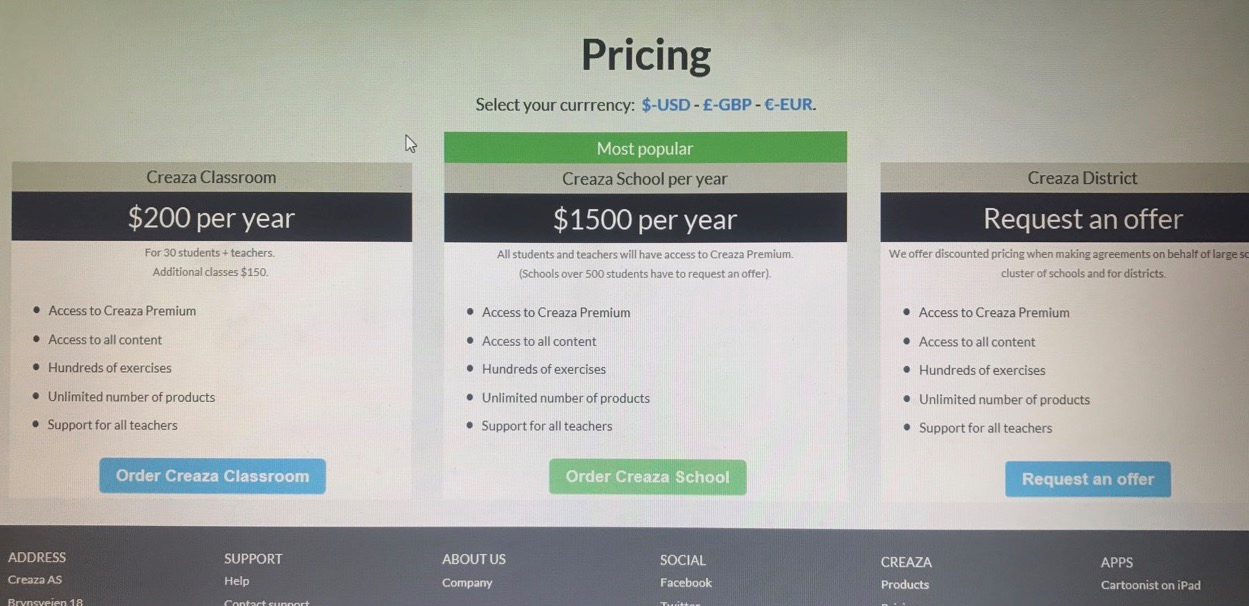
Cost
Features
Cartoonist enables you to easily create amazing digital stories, cartoons, and videos with text, backgrounds, characters, props, images, narration, sound effects, and music. Combine Cartoonist’s built-in content with your own uploaded files and recorded audio.
More on Cartoonist: https://web.creaza.com/en/help/create-a-cartoon
Mindomo lets you create mind maps and presentations with text, links, images, video, and audio. Combine content from the web with Mindomo’s built-in library, your own uploaded files, and collaborate in real-time.
The ready-made activities can be filtered by subjects, age groups, and tools. You can also search for specific topics and activities. Teachers can assign activities and follow their work along the way. They can comment and provide feedback along the way, and approve or reopen once the product has been handed in.
Create an Assignment
Prerequisites
If students are familiar with the basics of working with presentation tools, then they should be able to create on Creaza easily. There are alot of helpful tutorials on YouTube that younger users can refer to if there is difficulty with any of the tools. It is appropriate for students in grade 3 or above.
Alternative
Buncee
Benefits
- Create and Share Content from anywhere and continue your work on-the-go.
- You can customize your sharing to differentiate lessons.
- Empower Students as Content Producers
- The canvas’ ease of use allows for students of all ages to become content producers, without a learning curve.
- Encourage creativity with a wide array of graphics and intuitive media tools.
- Students can explore their creativity while having fun
- Assess student knowledge acquisition
- Students can visualize and demonstrate their knowledge acquisition in an engaging and fun way.
- Buncee can also be integrated into Google Classroom.
“I’ve seen powerful tools. I’ve seen easy-to-use tools. Buncee is both a powerful and easy-to-use tool”.– Dr. Jason Ohler, University of Alaska
https://www.edu.buncee.com/what-is-buncee
Drawbacks
- More design instruction would be helpful, and top-notch features come with a cost.
- An abundance of visual options could lead to poorly designed or cluttered presentations.
- Users should also be mindful of good design technique to avoid overcrowded slides.
Overall
Teachers could use Buncee for Education in place of other presentation software (like PowerPoint) to help students assemble online multimedia projects. With an upgrade to a Buncee Plus account, teachers could create a “classroom” through the dashboard. Which in turn allows teachers to create, accept, grade, and comment on students’ assignments. The site has an Educational Resources library, and once projects are completed, they can be downloaded in many ways such as JPEGs or PDFs, shared via email or QR code, or embedded into a blog, ect.
This tool is relatively easy for students to use, however, an abundance of visual options could lead to poorly designed or cluttered presentations. For teachers and students, Buncee simplifies the process of creating slides and slide shows, but users should also be mindful of good design technique to avoid overcrowded slides.
Conclusion
Considering the the triple E framework, I believe the benefits outweigh the drawbacks of Creaza as a presentation tool so, I would likely use it in my classroom.
Enhancement:
allows students to independently create mind maps, presentations, cartoons, and videos. They have many different choices of presentations to choose from– cartoonist, mindomo, and activities. Being able to create something unique to each student adds to the learning experience.
Engagement:
Creaza promotes social engagement between the student and their peers when sharing their work. As well as the feedback they can receive from their teacher.
Extension:
Students can use Creaza inside and outside the classroom allowing them to extend learning. It builds everyday skills and experiences with school learning with the power to connect students to their teacher outside the classroom. The teacher can send reminders as well as praise and helpful comments through this tool.

